Showing posts with label Misc. Utilities. Show all posts

30 December 2010

Seven Transformation Pack 5.0

Seven Transformation Pack 5.0

Seven Transformation Pack 5.0 | 35 Mb

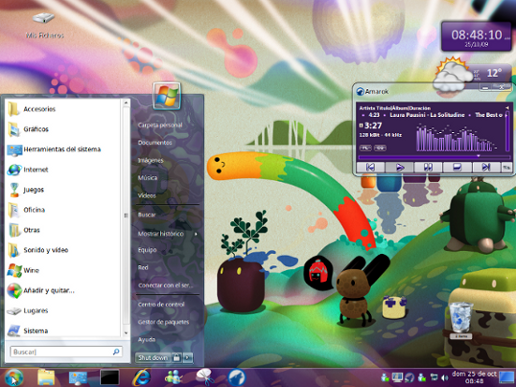
 Seven Transformation Pack makes the system Windows XP looks like Windows 7 and emulates some features of the new operating system from Microsoft. The package will update your operating system, replace some system files and add the desired theme and icons


Download


http://hotfile.com/dl/93044835/bcecd15/Svn.rar.html

15 March 2010

Utility to Create Bootable USB Drive to Install Windows Vista, Server 2008 and 7


A Bootable USB: Utility to Create Bootable USB Drive to Install Windows Vista, Server 2008 and 7

Imagine a situation where you need to install Windows Vista or 7 in a system but you don't have access to DVD drive. We all know Windows Vista, Server 2008 or 7 comes in DVDs and you'll need a DVD drive to install them. Then how will you install them? The solution is, you can create a bootable USB drive which can be used to install Windows without using DVD drive.

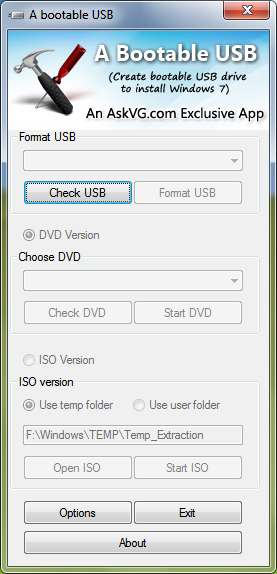
"A Bootable USB" is a small utility which can create a bootable USB drive to install Windows Vista, Server 2008 or 7.

www.askvg.com

Download Here

Windows 7 Taskbar Thumbnail Customizer Free Download


Windows 7 Taskbar Thumbnail Customizer is a free tiny portable tool for Windows 7 that allows users to resize & tweak their Windows 7 taskbar thumbnails left & right, in & out!

Windows 7 Taskbar Thumbnail Customizer will allow you to customize Windows 7 taskbar thumbnail previews in detail. You can change the size of the thumbnail, its spacing, top, bottom, left, right margins and mouse delay time too!

www.thewindowsclub.com/

Download Here

23 February 2010

Free Windows 7 DreamScene Activator


7 DreamScene Activator

This app enables you to set wmv/mpg file as destop background in windows 7. This supports only Windows 7 X86 edition in EN-US language.

This is a portable, easy to use toggle button DreamScene Activator. In order to set a video as background just left click on the wmv/mpg file and click "Set as Desktop Background".

vasanrulez.deviantart.com

Download Here

06 December 2009

Notebook - Transparent Notepad

This program is a Notepad in glass style, with the most important functions. It needs Windows Vista to get the Glass Style, and the .NET Framework, becouse it is written in C#

mkuw.deviantart.com

Download Here

01 November 2009

Free Windows 7 Logon Account Screen Editor

Account screen editor provides an easy way to customize the logon background. Click on "set background" and choose a picture for your logon screen.

Click on: "Default background" to change the logon screen background to the default background.

If a picture is to large, ASE will automatically make the picture smaller.

Now you can also select the shadow type.

Author: bcubing.deviantart.com

Download Here

30 June 2009

Free Vista Visual Master Application


What is Vista Visual Master?

Vista Visual Master is a free application that will help you to customize your Windows Vista easily. With a clean and simple interface it brings you an All-in-One set of powerful and neatly classified tools, settings and tweaks. Now You can change the look of the windows and buttons, change the system icons and hundreds of file icons, reconfigure the boot and logon screen, patch and apply your new themes, and you can customize Windows Vista according to your wishes.

It's rich in features:

* System Settings
Remove the small arrow on each icon; show Windows version on the computer desktop and hide all desktop items; disable or enable Windows Sidebar; disable changing wallpapers; force to enable DWM effect and create seperate processes for desktop and explorer.


* Theme Patch
Patch your original theme so that you can use other themes to personalize your computer.


* Change icons
Yes,You can replace about 40 system icons and hundreds of file icons, including "Computer","Recycle Bin" or even icons for WinRar, Microsoft Word or Microsoft Excel files, as well as icons for any file or folder.


* Boot and logon screens
With Vista Visual Master you can now change logon and boot screens - no more Windows logo when you switch on your computer. You can select whatever you want to see on the screen. Many logon screen and boot screen formats are supported. Just download them from the Internet and Vista Visual Master will be able to use them. You will be able to see a small preview for every logon and boot screen you have installed.
Author: vista123.net

Download Here

25 June 2009

Free UxTheme Patcher for Windows 7


This installer is designed to work on the following operating systems and languages:
- Windows 7 (all editions, Pre Beta, Beta 1)
- Windows Vista (all editions, SP1)
- Windows 2008 (all editions, SP1)
- Windows XP (Home, Pro, RTM, SP1, SP2, SP3, Corporate)
- Windows 2003 (Standard, Enterprise, Datacenter, Web, RTM, SP1)
- Windows Media Center Edition (2003, 2004, 2005)
- Windows XP Tablet PC Edition
- All Language Versions
- 64-bit versions of Windows are NOT supported

Application Name: NiwradSoft UxTheme Patcher 1.3
Author: niwradsoft.blogspot.com | niwradsoft.deviantart.com

Download Here

20 June 2009

Free UxTheme Patcher for XP SP3 and Server 2003


Application: Anolis UxTheme for XP SP3

This patcher supports Windows XP SP3 x86, Windows XP SP2 x64, Windows Server 2003 SP2 x86 and Windows Server 2003 SP2 x64. Earlier versions of NT5.1 or NT5.2 (e.g. Windows XP SP2 or Windows Server 2003 SP1) are not supported.

For Vista SP1 and SP2 click here.
For Windows 7 click here.

Author: anolisfx.deviantart.com

Download Here

How To Install Custom Visual Style in Vista SP1 - 2

Everyone's been asking how to install visual styles in Windows Vista so I've decided to re-post an article from winmatrix:

Download and replace these three system files (uxtheme.dll, shsvcs.dll and themeui.dll):

Windows Vista SP1:

download.gif Uxtheme Vista SP1 (32-bit) | Mirror
download.gif Uxtheme Vista SP1 (64-bit) | Mirror

Windows Vista SP2:

download.gif Uxtheme Vista SP2 (32-bit) | Mirror
download.gif Uxtheme Vista SP2 (64-bit) | Mirror

Instructions:

1. Login as a user with Administrative privileges -or- have Administrative credentials ready (check under the keyboard for a slip of paper).
2. Navigate to %systemroot%\System32
3. Right-click uxtheme.dll and click properties.
4. Take ownership of the file and close dialogs.
5. Repeat steps 3 and 4 for themeui.dll and shsvcs.dll
6. Right-click uxtheme.dll and click properties.
7. Give yourself (or group) Full Control permissions and close dialogs.
8. Repeat steps 6 and 7 for themeui.dll and shsvcs.dll.
9. Rename uxtheme.dll to uxtheme.old.
10. Rename themeui.dll to themeui.old.
11. Rename shsvcs.dll to shsvcs.old.
12. Copy patched files into %systemroot%\System32
13. Reboot (yes, this is really required)
14. Enjoy!

You can use Take Control or these registry files for taking ownership of system files in Vista:

Just add this file to your redistry and right click on the file you want to own and click on "Take Ownership".
Attached File own.zip ( 338bytes)

To remove the feature just run this file.
Attached File own_rem.zip ( 248bytes)

If you don't like above registery files, then follow these steps to do this manually:

Start button > All Programs > Accessories > Right-click on Command Prompt > Select Run as administrator > Click Continue.
At the command prompt, input takeown /f filepath
Now input icacls filepath /grant yourusername:f


For Windows XP and Server 2003 click here.
For Windows 7 click here.

Sources: winmatrix.com | withinwindows.com

17 June 2009

Free Ag SiO GUIkit for XP (Customization Pack)

Ag SiO (the chemical names for silver and onyx) was a skin designed by me (Mrrste) with the combined efforts of some of the best names in skinning, namely iiswiis, allhopeislost, zeolyte and rippernkind.

You get:

Windowblind for XP and Vista - By Mrrste
Styler Toolbar - By Mrrste
Wallpapers - By allhopeislost
Firefox 2.0 skin - By iiswiis
Xion skin - By zeolyte
Miranda skin - By Mrrste

Author: deskmodders.deviantart.com

Download Here

27 May 2009

Free Windows 7 Skin for ViStart


Windows 7 Skin for ViStart

Note: Please replace the resources and rollover folders in the ViStart directory (Usually in C:\Program Files\ViStart\) with the included folders in the archive. Also replace settings.xml so that the text in the search bar will be "Search programs and files" and not "Start Search".

Author: vher528.deviantart.com

21 May 2009

Free Windows 7 Transformation Pack for Vista


Seven Transformation Pack Keynotes:

New 3rd-party applications
ViGlance - Windows 7's Superbar emulation

Improved 3rd-party applications
ViStart - build recompile in native mode increasing its performance with Windows 7 skin
TrueTransparency - Improved stability with version 1.0 plus SevenStyle's skin

Functionalities update
Automatic theme applying - Setup now applies themes automatically without user's interaction after restart
Multi-user Login UI support - Allowing to see user accounts in horizontal view with multiline support
Setup personization - Allowed ViSplore and WinFlip and support load/save configuration
Superbar tweaks - Get Superbar UI with registry tweaks

Changes in Version 1.0 (From Vista Transformation Pack 9.0.1)
-Added Superbar tweaks for sleek and groupped taskbar item
-Added Windows 7 new wallpaper
-Added Windows 7 user pictures
-Fixed scrnrdr.exe application for being reported as malware
-Fixed WindowBlinds skin detection bug in Welcome Center
-Removed LClock as it doesn't fit new taskbar UI anymore
-Removed Styler toolbar as it becomes obsolete with ViSplore
-Removed VisualTooltip due to its glitches caused with the system
-Updated battery tray icon
-Updated logon screen with horizontal account list.
-Updated logon startup branding to Windows Seven
-Updated Vista Rainbar's default background to transparent (without border)
-Updated theming engine to apply themes and automatically
-Updated system to load/save configuration for Personalization
-Updated Transformation Destination information context for better understanding
-Updated TrueTransparency to version 1 with SevenStyle skin
-Updated user account's optimization settings
-Updated ViSplore with Windows Seven skin
-Updated ViStart to version 2.0 build 3468 (Native mode) with Windows Seven skin
-Updated visual styles to Windows 7 ones called "Windows Seven"
-Updated ViOrb to ViGlance (Superbar emulation)
-Updated Windows 7 icons
-Updated ViSplore and WinFlip to be safe applications

Author: windowsx | Website: deviantart.com

Download Here
15 May 2009

Free Taskbar Resize Tool for Vista


Taskbar Resize Tool for Vista
Microsoft Visual C++ 2008 Redistributable Package (x86):[link]

Author: flarejune | Website: deviantart.com

Download Here (.rar)
07 May 2009

Free Vista to Mac OSX Transformation Pack 2009


Convert Your Vista (of any bit 32 or 64) into MAC OS X Version using this small program Vista OS X 2009 latest edition | 30MB

Create a restore point before using this pack.

Website: crazythemes.com

Download Via Rapidshare


27 April 2009

Free Windows 7 Visual Style with Superbar for XP

Windows Se7en Visual Styles with Superbar for XP Users.

Now you can get the windows 7 start orb, superbar & windows 7 taskbar in XP.

This Pack Includes :
- The visual style.
- The styler theme.
- Some Beautiful Wallpapers (1920x1200).
- Windows 7 ViStart Skin.
- ReadMe.


For Enable thirdparty visual styles You need the uxtheme patch or StyleXP.

uxtheme patch found Here : [link]
StyleXP Software found Here : [link]
For Styler Toolbar Software Go Here : [link]

Author: sagorpirbd | Website: deviantart.com

Download Here (.zip)

Free Crystal Gadgets for Windows Xp and Vista

Crystal Gadgets for Windows Xp and Vista | 18MB


24 April 2009

Free Windows 7 Mod for XP


Windows 7 Mod for XP

This is Updated Windows 7 System Files for Windows XP Users.
This system files are turn your old XP just like Windows 7.

Download contains:
- Explorer.exe
- MyDocs.dll
- Shell32.dll
- Msgina.dll
- netshell.dll
- xpsp1res.dll
- xpsp2res.dll
- wscui
- wuaucpl
- sysdm and
- Replacer Utility
- ReadMe.

Important Instruction:

--Use the enclosed Replacer utility to put Explorer.exe in the WINDOWS main directory.
--Use the same enclosed Replacer utility to put all other system files into your Windows/System32 directory.
--Restart your computer.
Good Luck.

Conditions:

By downloading this Zip files you agree to the following conditions:

- This all system files is free for personal use only.
- It must not be used commercially.
- You can distribute it for free as long as the files are unmodified and this text file is included with the zip file.
- You may not sell them or use them for profit.
- Do not take credit for creating this all system files.
- I am not Responsable for any sort of damage to your computer from using this all system files.

Author: sagorpirbd | Website: deviantart.com

Download Here (.zip)

23 April 2009

Free windows 7 7077 Media Player 12 for Vista


1.Style "really" update to media player 12
2.Changed command button above
3.Changed the media player button below
---------------------------------------------------------------------------
In the archive there are two registry files called Restore e Settings; the settings file is for able the black text color of command above like windows media player 12. The Restore file is for restore the text before you've applied the Settings file.

Author: nightmare333 | Website: deviantart.com

Download Via MediaFire (.rar)

21 March 2009

Free Vista to Windows 7 Transformation Pack


Windows 7 Essentials Pack

This is a set of files that allow you to change the look of your Windows Vista to match that of Windows 7.

It Includes , a Windows Vista Theme, Tuneup Utilities Logon, WMP 11 Mod, User Pictures, Wallpapers from Build 7048, 7057 & Others to make your Windows Vista resemble Windows 7 as much as possible.


Kindly Copy The Following Files into their respective directories

Theme - 'C:\Windows\Resources\Themes'

User Pictures -' C:\Users\All Users\Microsoft\User Account Pictures\Default Pictures'

Wallpapers - 'C:\Windows\Web\Wallpaper' or your 'My Pictures' Folder

Login Screen - Requires you to use Tune-up Utilities , it can be found at [link]

Windows Media Player - Run 'Windows 7 WMP.Reg' & Copy 'wmploc.dll' into 'C:\Windows\System32' ( for Vista 32-bit ) or 'C:\Windows\SysWOW64' ( for Vista 64-bit )
[ In case you want to revert back to the default WMP 11 look run, 'Windows Vista WMP.Reg']

All the above said files are tested & working on Windows Vista Business x64 SP1

Kindly Note -- This is my first Windows Vista Theme Transformation Pack so discrepancies and inconsistencies are to be expected.

Author: ka-booka | Website: deviantart.com

Download Here (.rar)